
User-Centered AI Evals: Q&A with a GitHub Copilot PM
How to define 'good' to build AI features people actually use at scale

As I write and teach about AI, I keep meeting PMs doing incredible work in this space. So I’m starting something new: interviewing the people building AI products and sharing what they’ve learned.
Elle Shwer led Copilot code review at GitHub, an AI agent that runs millions of code reviews weekly. In this conversation, she shares her end-to-end process for growing the Github Copilot code review feature into a success.
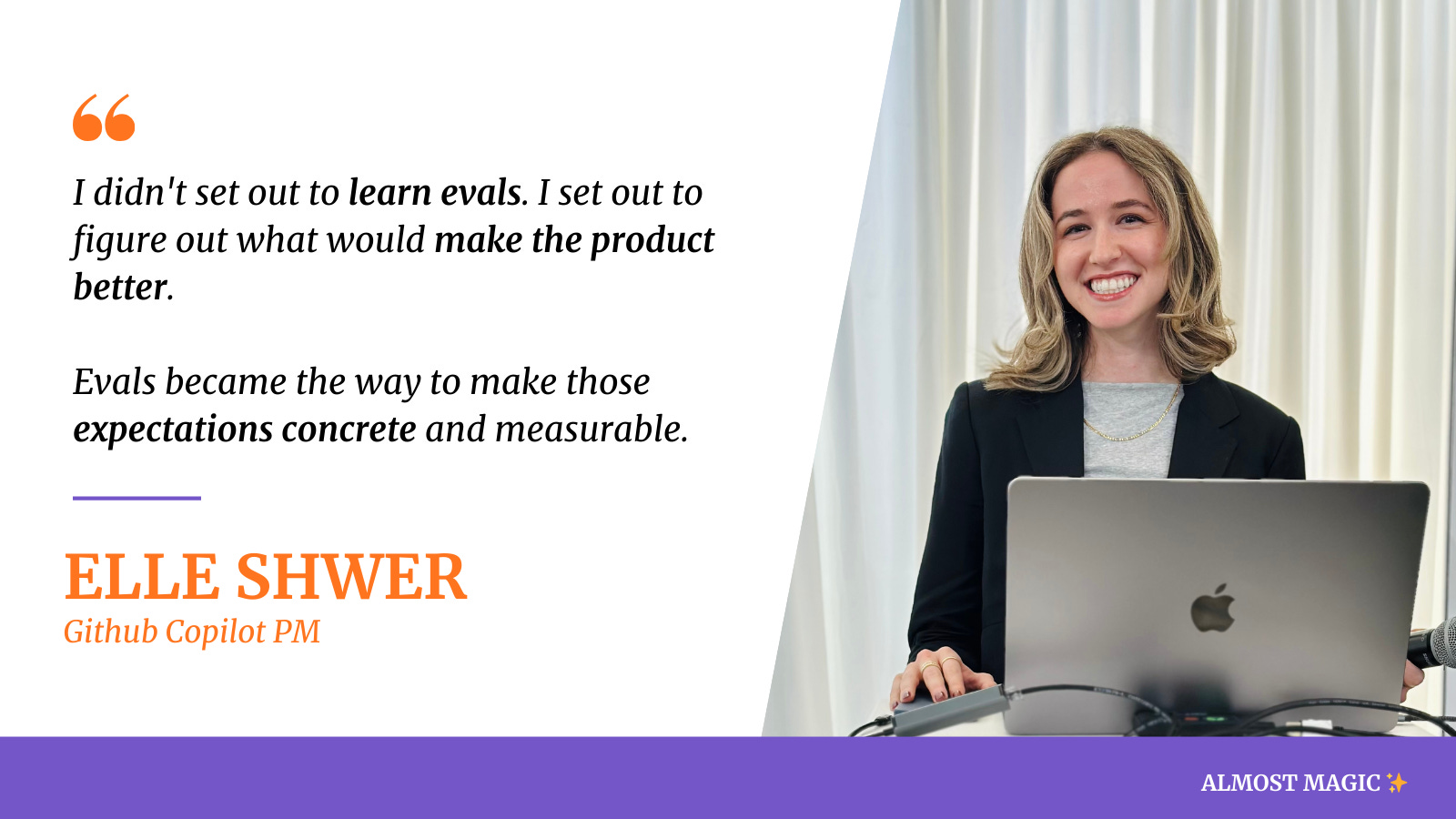
Elle’s approach is refreshingly practical and grounded in understanding users:
1. Use LLMs to analyze user behavior at scale
2. Talk to users to understand their mental models and pain points
3. Translate the feedback into evals and shipped features
4. Measure quality with trends from multiple signals instead of one metric.
Before we dive into the insights and full interview: if you’re not subscribed yet, join PMs learning to build better AI products:
Here are the top insights:
1. PMs became the “Swiss army knife” filling the AI role ambiguity.
As AI systems moved into production, someone needed to define what “good” actually looks like for users, and that responsibility naturally fell to Product.
Why it matters: A year ago, AI felt like “an interesting thing you could add to a UI.” Now users expect it at higher quality. The bar moved from “wow, this is AI” to “does this solve my problem better than the old way?” PMs are ultimately responsible for driving that outcome with their teams.
2. She’d never heard of “AI evals” before GitHub. She learned through collaboration.
Elle had not worked on an AI product that needed evaluations before this. She learned about evals by working with engineers on early Copilot Chat, where they had bare-bones evals measuring code efficacy.
Why it matters: You don’t need to be an evals expert first. Start with understanding what users need, and the evals will emerge naturally from that work.
3. LLM analysis revealed users wanted to “reason about code, not just read about it”.
The biggest surprise from analyzing chat conversations: users weren’t asking high-level documentation questions as expected. They were trying to understand concrete errors, make sense of code they were reviewing, and figure out if changes looked correct.
Why it matters: Use LLMs to analyze what users are actually doing at scale. The patterns might completely contradict your assumptions about the product.
4. She reverse-engineered “senior engineer quality” with one simple prompt.
Elle pulled comments from staff engineers and junior engineers from GitHub’s internal data warehouse, then asked Copilot Chat: “What are qualities or behaviors you see in the staff comments that you don’t see in junior-level engineers?”
The insight led to golden scenarios for code review quality: not just catching bugs, but explaining why something matters and anticipating future impact.
Why it matters: You can use AI to understand what “good” looks like in your domain. You don’t need to manually read thousands of examples. An LLM can find the patterns, and you decide what to do next.
5. Live user testing revealed concrete preferences that “quality” surveys miss.
Without grounding on the product itself, users would say vague things like “I just expect it to be better or higher quality.” But watching them use specific scenarios, Elle heard actionable feedback:
“Oh that’s too long of a response”
“That’s not correct, it should XYZ”
“I wouldn’t normally write it this way, I would do it that way”
Why it matters: This is significantly more effective than abstract feedback. Testing specific scenarios lets users point to exactly what’s wrong and what their expectations are.
6. Open-source maintainers shifted the golden scenarios from “catching bugs” to “filtering out low code quality”.
Talking with maintainers revealed they were drowning in low-quality, LLM-generated PRs where authors didn’t fully understand the code. For them, Copilot code review wasn’t just about catching bugs. It was about filtering noise and assessing whether changes met contributor guidelines and project standards.
This led to a shipped feature: custom instructions in Copilot code review, letting teams encode their own standards directly into the review process.
Why it matters: Talking to a variety of user segments and comparing to competitive research can show you where opportunity is. Rather than picking a single “correct” review style, they focused on personalization as core to the roadmap.
7. She measured quality with sparklines: thumbs-up rate, sentiment, and retention.
For Copilot code review, Elle tracked a combination of signals on a weekly basis:
Thumbs-up rate and positive sentiment (leading indicators of quality)
Week-over-week user retention (lagging indicator of real value)
Seeing those metrics trend consistently upward with clear green sparklines was the signal that changes were meaningfully improving the product.
Why it matters: You need multiple signals. One metric can be misleading. The combination tells you if you’re actually moving in the right direction.
8. The most important skill: use AI products every day, starting from “play”.
Elle said she wouldn’t worry about learning things like building an agentic loop, which model is best, or even how to write evals. Instead, she recommends starting from a place of play.
Her hands-on usage helped her understand both the boundaries of what LLMs can and can’t do, and the real opportunities they create.
Why it matters: Playing around with AI tools is the fastest way to build intuition. You can’t just passively read or watch stuff. You need to feel where AI breaks and where it shines.
The Full Interview
Setting the stage
What was your role at GitHub?
I was the product leader for Copilot code review, GitHub’s AI agent that helps developers merge code faster by proactively spotting bugs, issues, and improvements during the pull request process.
I worked across four engineering teams and owned the product from public preview through GA to April 2025 and beyond. In October 2025, we introduced an agentic review loop, which shifted the product from single-pass suggestions to more iterative, context-aware reviews. Since then, my focus has been on improving the quality, consistency, and reliability of the reviews at scale.
Today, Copilot code review supports hundreds of thousands of developers and runs millions reviews weekly.
Getting started with evals
Why do you think everyone is talking about “AI evals” right now? What changed in the last year?
I think AI evals have become such a hot topic for a few reasons. First, PMs are often the people who most deeply understand what users are actually trying to achieve, and evals force you to make that understanding explicit. As AI systems moved into production, someone needed to define what “good” actually looks like for the user, and in many cases, that responsibility naturally fell to Product.
I also think there’s still a lot of ambiguity around roles and responsibilities in AI development. The idea of an “AI engineer” is still being defined in many organizations, and in that gap, PMs have stepped in as the Swiss army knife.
What’s really changed over the last year is maturity. A year ago, AI often felt like an interesting thing you could add to a UI that might add value, but there wasn’t a clear product-market fit around how AI actually improves individual user productivity. Now, we’re much more familiar with those products, the interfaces where AI shows up feel more obvious and more seamless, and the expectations are higher.
Before you started working on Copilot, had you ever built AI evals? How did you learn?
Honestly, I had never even heard the term “AI evals” before joining GitHub. My prior experience with LLMs was more adjacent: building a vector search solution. There, the focus was much more on the database and retrieval layer than on evaluating the quality of the results themselves.
I really learned about evals through collaboration with engineers. When I joined GitHub, I started working on Copilot Chat while it was still very early, and we had some very bare-bones evals focused on measuring things like code efficacy using an LLM. My role was to help define what skills we actually wanted Copilot Chat to have. Early on, that meant identifying capabilities that were unique to GitHub, like answering questions about GitHub Issues, Discussions, and Pull Requests.
From there, I spent a lot of time interviewing customers to understand how they were actually using Copilot Chat. I didn’t set out with the goal of learning how to write better evals. I set out with the goal of figuring out what would make the product better. In doing that, I started identifying the hero scenarios that really mattered, and evals became the way to make those expectations concrete and measurable. Those expectations and requirements translated very naturally into evaluations.
When it came to actually writing the evals, I met with engineering to understand what was actually possible, and then based on the things that were possible, I helped define what questions we’d want Copilot to be able to answer very well, and then I handed that off to engineering. Engineering mocked up a few evaluations, and then I sat down with engineers to read what they mocked and left commentary on what I thought made sense or didn’t make sense, and what I thought was good output versus bad output.
Getting User Insights
You analyzed data looking at conversation sentiment and thumbs up / thumbs down data. Were there any surprises when you went from this analysis?
One of the most interesting outcomes of that analysis was simply uncovering what users were actually trying to do with the product. At the time, our assumption was that because this experience lived on github.com (and not directly in an editor where users were writing code), usage would skew more toward documentation or high-level questions.
What the analysis surfaced instead was that many users were trying to understand concrete errors in their code and make sense of the code they were reviewing. They were asking questions about why something was broken, what a piece of code was doing, or whether a change looked correct. They were essentially using the product as a way to reason about code, not just read about it.
It’s also important to note that the data in this analysis predated Copilot code review. In hindsight, it served as a strong signal that helping users review and understand code changes was a real unmet need.
You also reverse-engineered a senior engineer style for code review using an LLM to analyze actual code reviews. Can you walk through how you did this?
First, I used our internal data warehouse to pull comments based on the engineer’s level.
Then I copy/pasted those into Copilot chat for analysis.
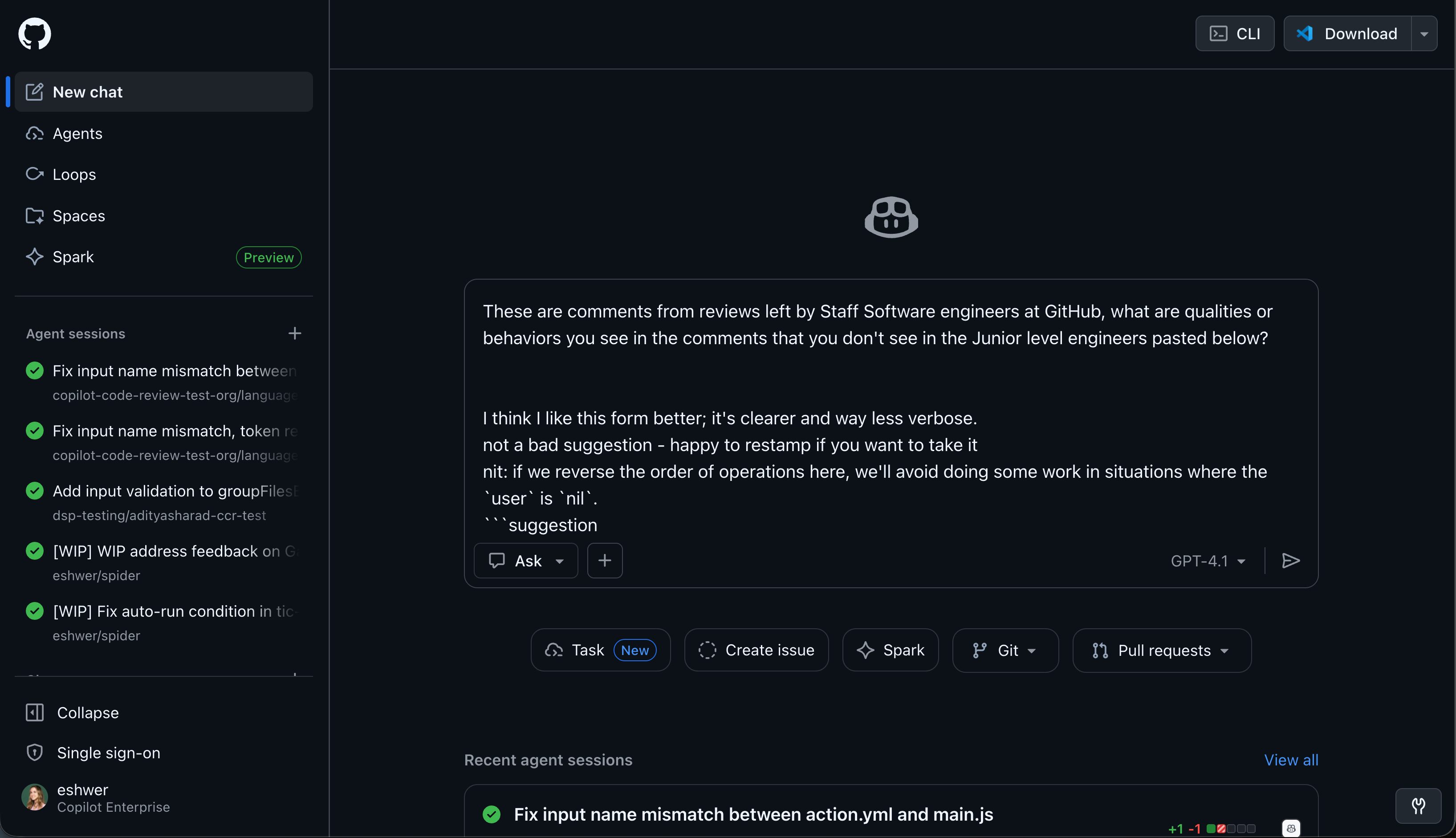
The main insight was senior engineers would spend more time explaining why code was wrong rather than just pointing out the error.
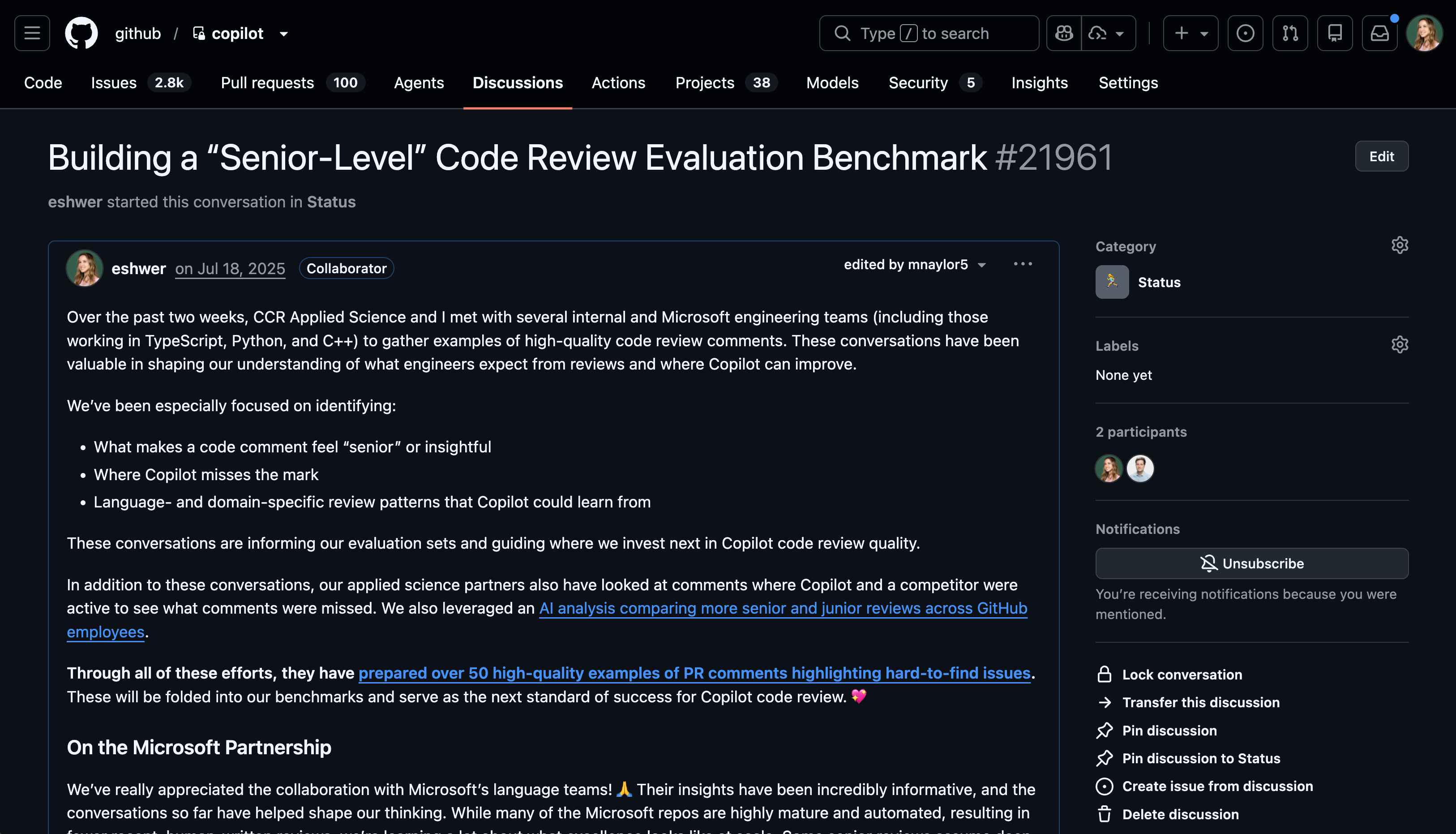
I took those insights and pulled that analysis into a discussion to share out with my team and create the learning loop that gave my team access to this information to create evaluations based on it.
Did you also get feedback directly from users?
Yes, for both products, I talked to users directly and had them use the in-production version of the product. In some cases, if the user didn’t have access, I would share my screen and let them navigate it.
In my experience, we got more tangible feedback from the user with them showing us the real product. Without grounding on the product itself, we’d get responses like “I just expect it to be better or higher quality,” but it’s hard to define quality without seeing good and bad.
By testing specific scenarios, I could get the user to say things like “oh that’s too long of a response,” “that’s not correct, it should XYZ,” “I wouldn’t normally write it this way, I would do it that way.”
From both the code review and user insights, we were able to identify some of our more common failure modes by seeing the tangible examples that we could then go debug on our end.
You talked with open-source project leaders. How did this shift your viewpoint?
Talking with open-source maintainers shifted how we thought about our golden scenarios. Many of them are dealing with a flood of low-quality, LLM-generated pull requests where the author may not have fully understood the code. From their perspective, Copilot code review wasn’t just about catching bugs. It was a way to filter noise and assess whether a change actually met contributor guidelines and project standards.
These conversations also reinforced how subjective code review quality is. Some users want feedback on everything, while others only want the most critical issues surfaced. Rather than trying to pick a single “correct” review style, this pushed us to think about personalization as a core part of the roadmap. Competitive research further validated that direction and helped us frame future golden scenarios around adapting to different reviewer preferences instead of optimizing for a one-size-fits-all experience.
Collaborating with your cross-functional team
How did you and your engineering team handle the uncertainty AI work can sometimes have in time to get to quality in your planning and staffing?
The workshops were less about locking in solutions upfront and more about aligning on where the biggest problems actually were and how to prioritize them. Including engineers was especially valuable because they were both builders and representative users of the product.
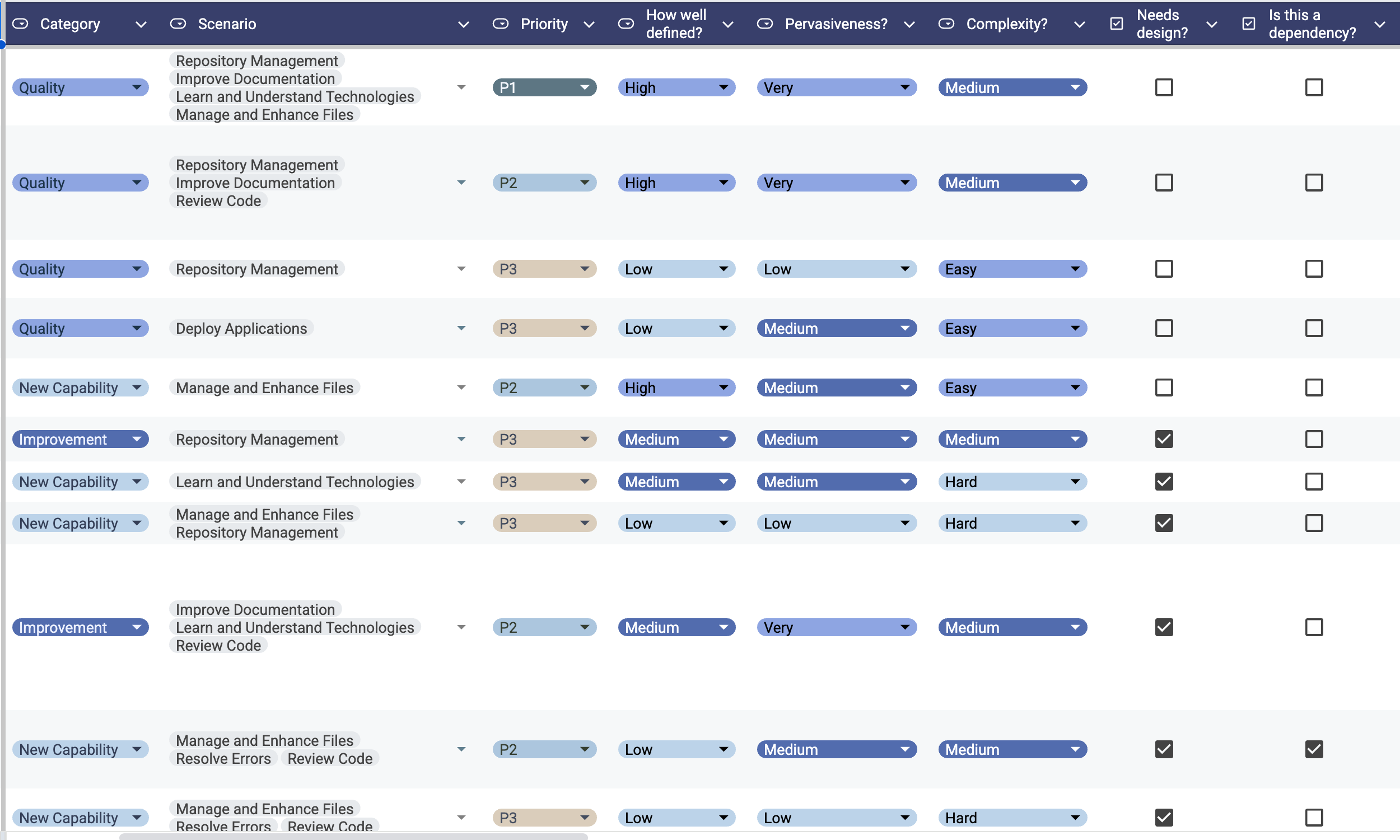
For each hero scenario identified through LLM-based grouping, we reviewed raw user questions alongside the model’s responses. We looked for patterns where the LLM was doing well versus where it consistently fell short, and then clustered those gaps into a small set of underlying issues. From there, we discussed potential ways to address each issue to get a rough sense of feasibility and cost.
I then translated those discussions into a structured prioritization framework (essentially a RICE-style score), which allowed us to balance impact, confidence, and effort without overcommitting too early. That approach helped us plan and staff work in a way that supported exploration while still giving the team clarity on what to focus on next.
How did you take the insights and translate them to shipped improvements?
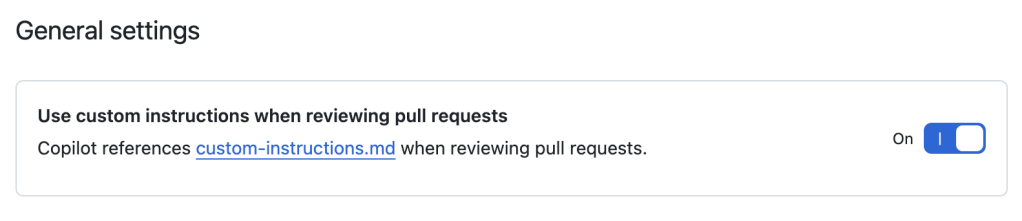
One concrete insight from talking with open-source maintainers was that they cared deeply about whether incoming changes aligned with their project’s contribution guidelines, not just whether the code was technically correct. This was also frequently raised in our Enterprise and individual interviews as well.
In response, we expanded support for custom instructions in Copilot code review. This allowed teams to encode their own standards and expectations directly into the review process, so the agent could evaluate changes in the context of what that project considered high quality.
What signals told you the changes were working?
We measured impact differently depending on the product.
In Copilot Chat, we re-ran the LLM-based scenario groupings alongside sentiment analysis on a monthly cadence to track how usage patterns and user needs were evolving over time. That helped us validate whether changes were actually shifting behavior, not just improving isolated responses.
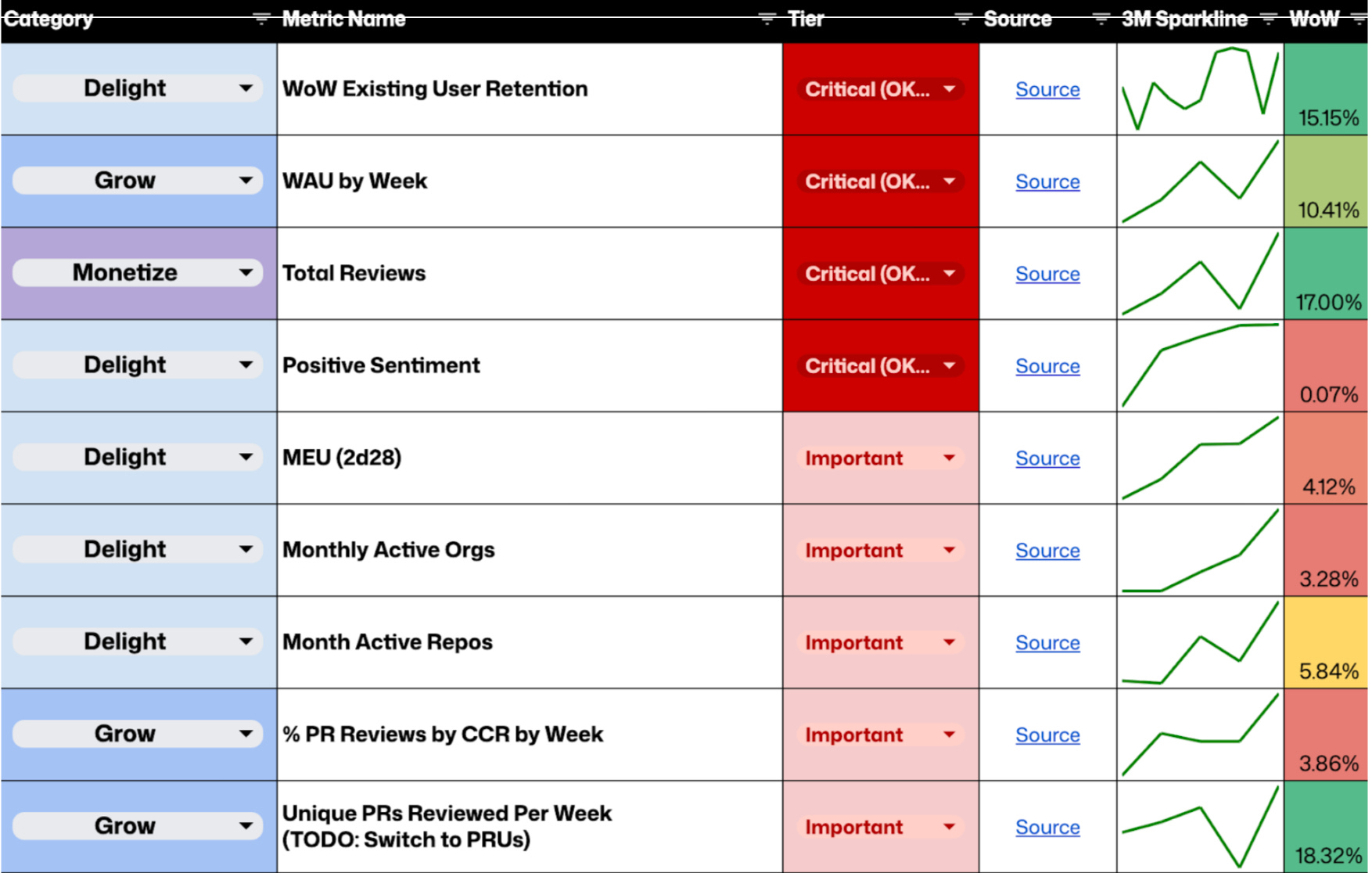
For Copilot code review, we looked at a combination of leading and lagging indicators. On a weekly basis, I monitored thumbs-up rate and positive sentiment as early signals of quality, and week-over-week user retention as a lagging indicator of real value.
Seeing those metrics trend consistently upward with clear green sparklines over time was a strong signal that the changes we made were meaningfully improving the product.
Advice for PMs building AI features
What are the top skills PMs should invest in if they expect to work on an AI feature this year but haven’t yet?
If you haven’t worked on an AI feature yet but want to, I think the most important place to start is simply by using these products every day. When I first joined GitHub, I was honestly a bit of a laggard in adopting AI tools. I didn’t yet have tangible experience with them or a strong intuition for how they could improve my productivity.
Once I started working on an AI product, I made a point to use it for everything and anything I could. Before starting a task, I’d ask myself, “Can I use AI for this?” and then I’d try. That hands-on usage helped me understand both the boundaries of what LLMs can and can’t do, and the real opportunities they create.
I wouldn’t worry too much early on about the nitty-gritty details: how to build an agentic loop, which model is best, or even how to write evals. I think it should start from a place of play. That play builds intuition and empathy, and from there it becomes much easier to translate experimentation into real product needs for your customers.
I also really like using this website for inspiration on how AI is more than just “chat”.
Closing thoughts
The best AI products don’t come from understanding models. They come from understanding users deeply enough to define what “good” looks like, then making that definition concrete enough that engineers can build and measure against it.
She recently left Github and is joining Figma to work on their dev tools and explore new approaches for how modern AI-first product teams build together. As a Figma and Figma Make user, I can’t wait to see what she builds!
And most importantly, I love Elle’s advice that if you’re building AI products this year, start with play. Don’t worry so much about learning all the technical nitty gritty. Just use the tools every day and learn their boundaries.
Thanks to Elle Shwer for sharing these insights. You can follow her on LinkedIn.
What questions do you have about building AI products? Drop them in the comments!
Know a PM building great AI products that I should interview for Almost Magic? Shoot me a DM.
Related reading:
If you found this useful, share it with a PM friends who want to learn about building AI products.
This is a great interview, really liked how Elle walked through the motions of uncovering insights in a true product fashion. Point #4 really resonated , finding out which use cases add value and simulating those desired behaviours through the use of LLMs is how we can make the most of this technology.